Free Flashcard Maker: Create Study Cards Without a Subscription
You shouldn't need a credit card to make a set of flashcards. The concept is simple: a question on one side, an answer on the other. The basic version of this doesn't require a subscription.
And yet, many of the most popular flashcard tools have quietly moved key features behind paywalls. You can create cards for free, but studying them efficiently costs money. You can flip through cards for free, but the scheduling system that makes the studying actually work requires an upgrade.
This guide is about the tools that don't do that. Here are the best free flashcard makers available right now, with a clear breakdown of what each one actually gives you without paying.
What a Good Free Flashcard Maker Needs
A flashcard maker that's genuinely useful at no cost should cover three things.
Card creation should be fast and flexible. You shouldn't be fighting with the interface to add a card. And you should be able to add images, not just text, since visual memory is significantly stronger for many subjects.
Studying should be built in. A tool that only lets you create cards but not study them isn't a flashcard app. It's a note-taking app with a flip animation.
The study system should be smarter than random. Shuffling cards randomly is the minimum. A free flashcard maker worth using should track what you know and show you struggling cards more often than cards you've already mastered. This is the same principle behind active recall: your brain retains information better when it has to work to retrieve it.
The Best Free Flashcard Makers
1. Space Repeat
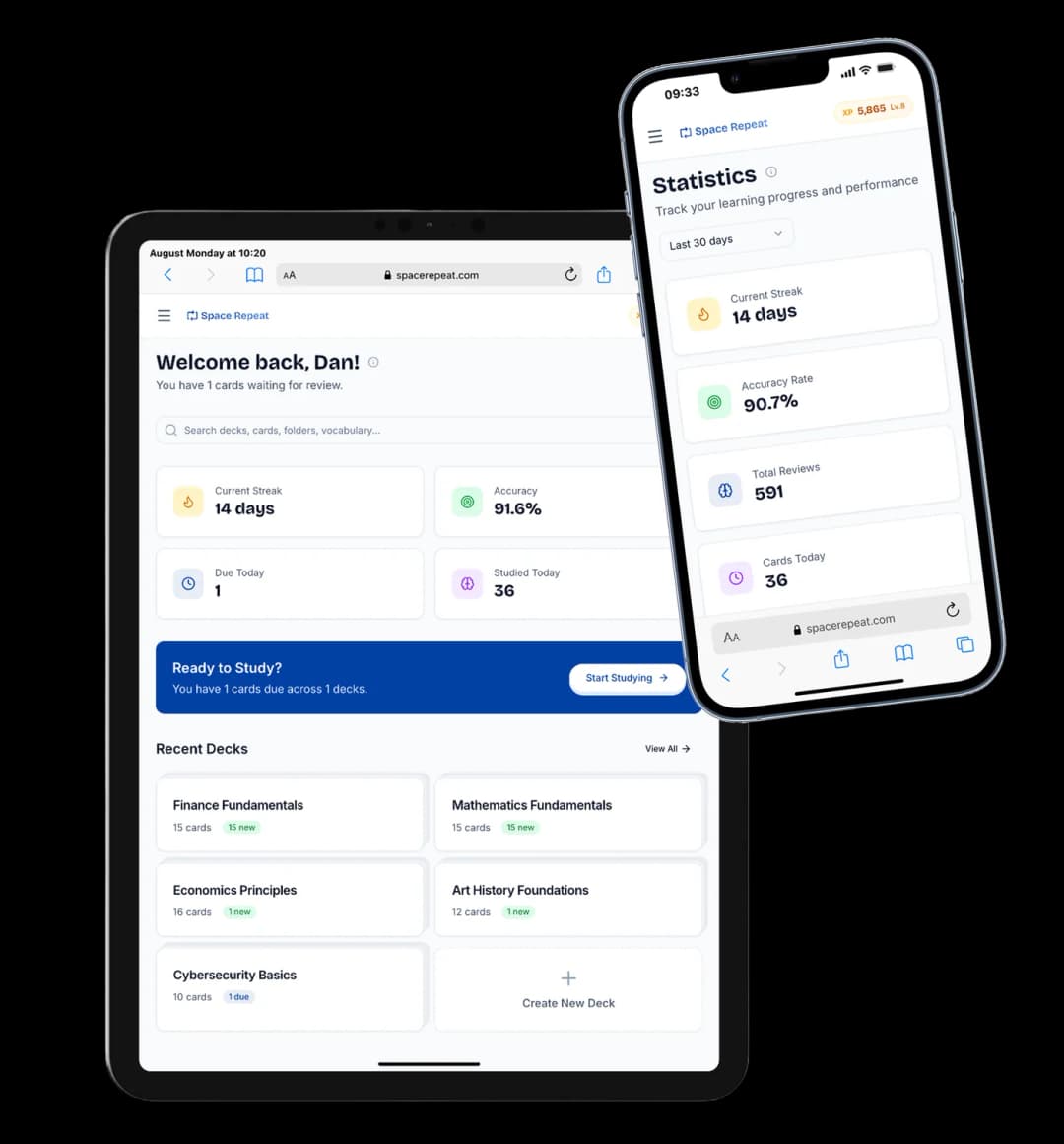
Space Repeat is a free flashcard maker with no subscription required for any part of the core experience. You create an account, make a deck, and start adding cards. The whole process takes a few minutes.
Card creation is straightforward. You write the question, write the answer, and optionally add an image. There's no clutter in the editor. You can build a deck of 50 cards in a single sitting without the process feeling slow.
What separates Space Repeat from basic free flashcard tools is the study system. After each card, you rate how well you knew it. The app uses that rating to schedule when you'll see the card again. Cards you consistently get right come back less often. Cards you keep missing come back soon.
This is spaced repetition, and Space Repeat is entirely free. No subscription, no paid tier, and a generous free plan (up to 50 decks, 100 cards per deck) that's set to expand over time. You're not getting a watered-down version of the app. Everything works from day one.
Cost: Completely free. Generous deck and card limits, image support, full spaced repetition scheduling.
2. Anki
Anki is the most powerful free flashcard software available. It supports text, images, audio, and video on cards. The scheduling algorithm is sophisticated and deeply researched. The community has produced shared deck libraries for almost every subject imaginable.
The creation experience is rougher than modern alternatives. Adding cards requires navigating a dated interface, and new users often find the settings confusing. The learning curve is real, but the payoff for learners who push through it is a genuinely excellent study system at no cost.
Free on Windows, Mac, Linux, and Android. The iOS app costs a one-time $25 fee.
What's free: Full functionality on all platforms except iOS.
3. Quizlet (Free Tier)
Quizlet has the largest library of shared flashcard sets of any app on this list. If someone has already built a deck on your topic, you can find it on Quizlet and start studying in minutes. The card creation experience is polished and fast.
The core limitation is that spaced repetition sits behind Quizlet Plus. The free tier gives you basic study modes and access to shared content, which is genuinely useful, but the scheduling algorithm that makes flashcards work long-term requires a paid plan.
What's free: Card creation, basic study modes, access to public shared decks.
4. Cram
Cram is the simplest option on this list. You make cards and flip through them. No algorithm, no scheduling, no account required to start. For students who need to run through material quickly before an exam, the simplicity is a feature rather than a limitation.
What's free: Basic card creation and review, no account needed.
5. Brainscape (Free Tier)
Brainscape lets you create your own decks and study them with a confidence-based rating system on the free plan. You rate each card from 1 to 5 based on how well you knew it, and the app adjusts your review schedule accordingly. The pre-made deck library covers structured academic subjects.
What's free: Custom deck creation, confidence-based studying, limited access to shared decks.
Free Flashcard Maker for Specific Subjects
Different subjects have different needs. A few notes on what works where.
For language learning: You need image support and ideally audio. Space Repeat is completely free and supports images, making it a strong pick for vocabulary building with visual associations. Anki supports audio as well, if you're willing to set it up.
For medical and law school: Anki's shared deck library has extensive pre-built content for medical subjects, anatomy, pharmacology, and bar exam prep. If you're studying one of these fields, the Anki setup cost is worth it.
For general exam prep: Space Repeat is the fastest to get started. You can go from signup to studying in under five minutes, which matters when you have a lot of material to get through.
How to Make Flashcards That Actually Work
The app matters less than how you make your cards. A few principles that apply to any free flashcard maker.
Write one concept per card. Cards that cover multiple ideas are harder to rate and harder to schedule correctly. If a card feels like it's asking two questions, split it into two cards.
Use your own words. Copying text directly from a textbook produces cards that feel familiar but don't test real recall. Rephrasing the material in simpler language forces you to understand it first, which makes the card more useful when you review it later.
Add images wherever the subject allows. Visual memory is strong. A card with a diagram or photo alongside a label will stick better than a text-only equivalent, especially for anatomy, geography, or any subject with physical forms.
Keep decks focused. A deck of 300 mixed cards is harder to work through than three decks of 100 cards organized by topic. Focused decks are easier to review, easier to track, and easier to restart if you fall behind.
The Bottom Line
If you want a free flashcard maker that covers the full experience without a subscription, Space Repeat is the strongest current option. Card creation is fast, image support is included, and the spaced repetition system is available from the start.
Anki is the alternative for learners who want deeper algorithmic control and are willing to spend time on setup. Quizlet fills the gap if you primarily need access to pre-built shared content.
The best flashcard maker is the one you'll actually use. Pick the one that removes the most friction from building and reviewing your cards every day.
For the study technique that makes any flashcard tool more effective, see Active Recall: The Most Effective Study Technique. If spaced repetition scheduling is the feature you care most about, The Best Free Spaced Repetition App in 2026 focuses specifically on that.
Ready to try spaced repetition?
Space Repeat makes it easy to create flashcard decks and study with proven memory techniques. Free to start.
Start Free